
Scheduling and rostering, with clashes caught before they become double bookings
Less admin. More clinic. Praxia gives your front desk and your clinicians one clear picture of the day, the week and who is working when, so the diary stops being a daily puzzle.
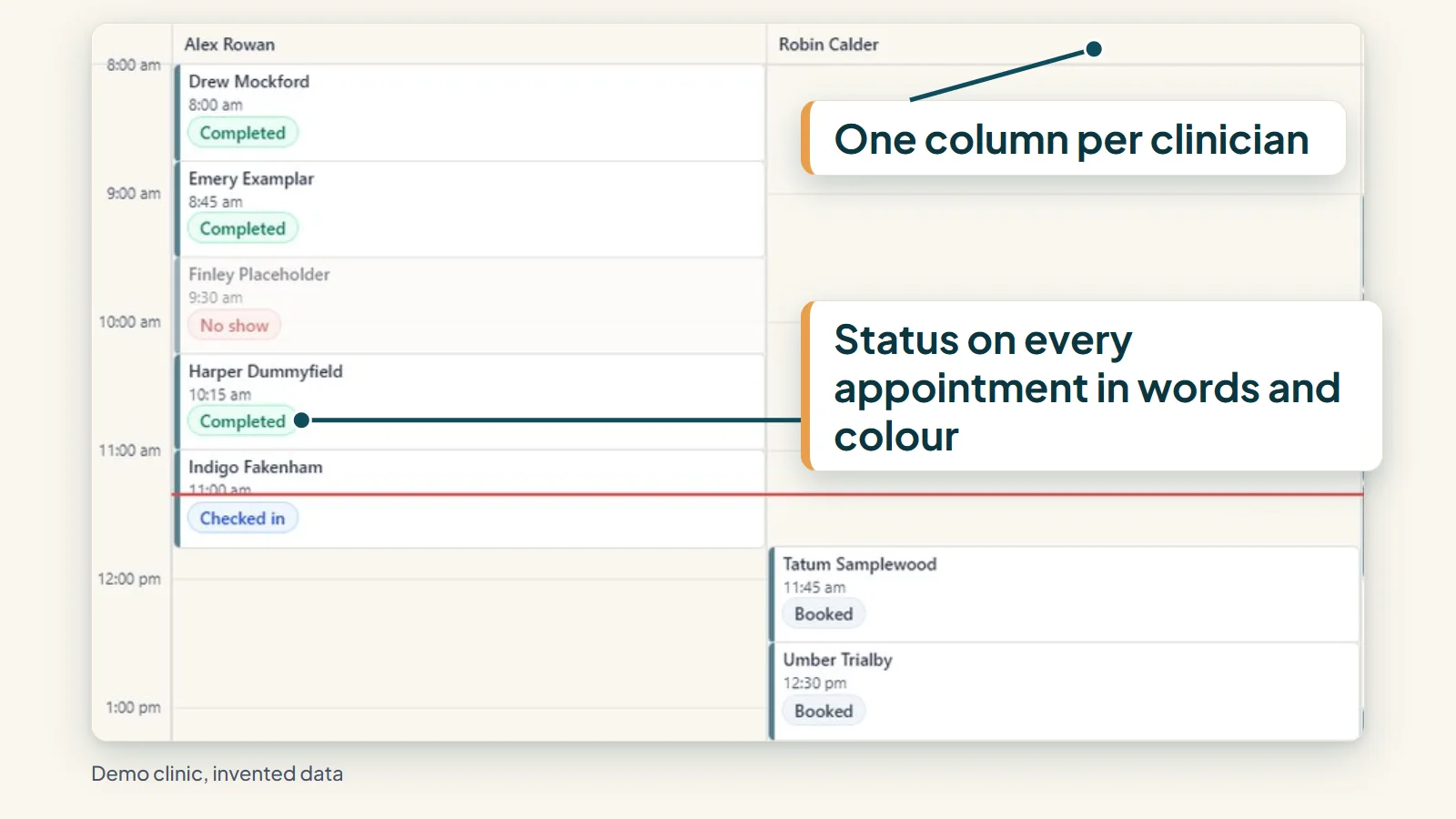
The day and the week, at a glance
Each clinician has a day view and a week view laid out as a schedule grid. Appointment statuses are shown in words as well as colour, so nothing depends on reading a colour code at a glance, even on a screen in poor light.

The aim is simple: whoever opens the diary should be able to see what is booked, what has changed and what needs attention without hunting for it.
- One schedule grid per clinician, by day and by week
- Status shown in words and colour together
- Built with a working clinic, starting with its own pilot practice
Rosters that catch clashes early
Set your clinic roster by the week and copy it forward when next week looks like this one. Praxia flags clashes before they turn into double bookings, which is a much cheaper moment to find them than a Monday morning with a full waiting room.
Rostering sits next to the diary, not in a separate spreadsheet. A change to who is working is visible where the booking decisions are made.
- Weekly rosters, set once and copied forward
- Clashes flagged before they become double bookings
- Roster and diary kept in the same place
Bookings flow in, changes flow through
Appointments booked on your clinic’s calendars flow into Praxia as visit records. Cancellations and reschedules sync too, so the record a clinician opens before a consult is designed to match what happened at the front desk.
That means the diary, the visit and the clinical note belong to one chain. Clinicians open a visit that already exists rather than re-creating it, and the aim is that the front desk does not enter the same change twice.
Fill a freed-up slot from your waitlist
When a patient cancels, Praxia can offer the freed-up slot to patients on your waitlist. Offers are time limited, so a slot does not sit reserved while someone decides.
This capability is part of the pilot product, and offers run when a cancellation opens a slot.
Moving across from your current booking tool
Praxia is designed to bring your diary, patient records and follow-up into one system. The switch is planned with you during onboarding, not flipped on day one: we agree what moves, check it, and only then change over. Read more on our switching page.
Onboarding is operator-led. A person from Praxia runs the set-up with you, rather than leaving you with a manual and a trial login.
What this means for the front desk
A diary is only useful if the people using it trust it. Reception should not have to ring a clinician to ask whether a slot is real, and clinicians should not have to open three tools to find out who is in tomorrow. Putting the schedule grid, the roster and the visit record in one place is meant to remove those small interruptions that add up across a week.
Because bookings from your clinic calendars arrive as visit records, the work that follows a booking, such as the clinical note and any follow-up, starts from the same record. So a consult does not have to begin from a blank record.
What this means for the clinic owner
Owners usually care about two questions: is the day running smoothly, and are the right people rostered for it? A weekly roster that copies forward, with clashes flagged early, answers the second question before the week starts. The grid answers the first while the day is happening.
Access in Praxia is role based, so a reception login, a clinician login and an owner login see what suits each job.
If you want the full picture of how the schedule connects to notes, follow-up and reporting, how it works walks through the chain, and the patient communication page shows what happens once a patient has been seen or has stopped coming.
Where Praxia is today
Praxia is being piloted with Evolution Medical Care, a clinic run by Praxia’s founders, and is being onboarded to it now. Praxia Clinical Solutions is an Australian company, currently in incorporation.
There are no real-clinic screenshots on this page yet because we would rather show you the product in a walkthrough than show you an empty demo. For the wider picture, see all features, how it works and security and data.
Scheduling questions
Can I run several locations in Praxia?
Ask us in a walkthrough. We would rather talk through your sites than promise something we have not yet seen run across more than one clinic.
Does Praxia replace my booking tool straight away?
No. The switch is planned during onboarding, with checks before anything changes over.
Is waitlist backfill running at clinics today?
Waitlist backfill is part of the pilot product and runs when a cancellation opens a slot. We publish no fill rates or results.
What does it cost?
Praxia is priced per practitioner per month, starting at A$199 (excluding GST) for a solo practitioner, with lower per-practitioner rates as a clinic grows. The full price list is on the pricing page.
Request a walkthrough
See the schedule grid and roster on a walkthrough. Praxia is working with a pilot clinic, so we will tell you honestly whether it fits yet. We will reply to arrange a time.
Please leave out any patient information. How we handle your details is set out in our privacy policy.
Not ready to talk? Join early access and we will keep you posted.