
Product tour: a clinic day in Praxia
This is what Praxia looks like in use. Every screen below is a real screenshot of the product, taken in a demo clinic called Demo Physio Clinic. The clinic, its three clinicians and its patients are all invented. No real person or clinic appears anywhere on this page.
How to read this tour
We follow one invented clinic day from the first appointment to the end-of-month numbers. We only describe what is visible in each screenshot. Where a capability is in development, the status page says so in plain words, and the features page goes into more detail on each area.
Praxia is being piloted with Evolution Medical Care, a clinic run by Praxia’s founders. We have no external customers to show, which is why this tour uses a demo clinic.
8:00 am: the day, clinician by clinician
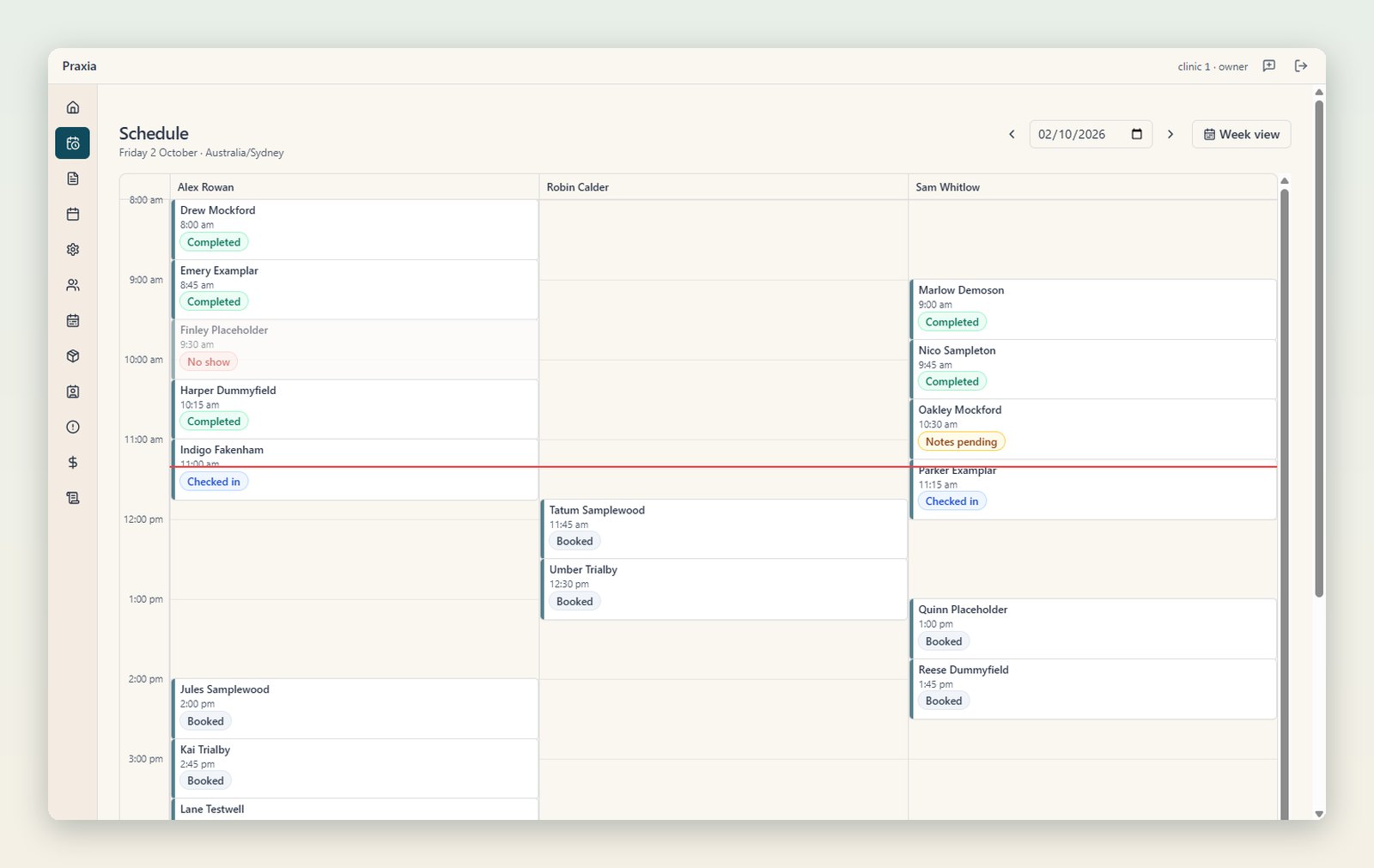
The day view gives each clinician a column. Appointments sit at their start time, and each carries a status in words and colour: completed, no show, notes pending, checked in, booked. A red line marks the time now.
 Tap or click to view full size
The schedule day view for Demo Physio Clinic, one column per clinician. Screenshot of a demo clinic with invented data.
In this view the morning’s visits are mostly finished, one patient did not attend, two patients are checked in, and the afternoon is booked.
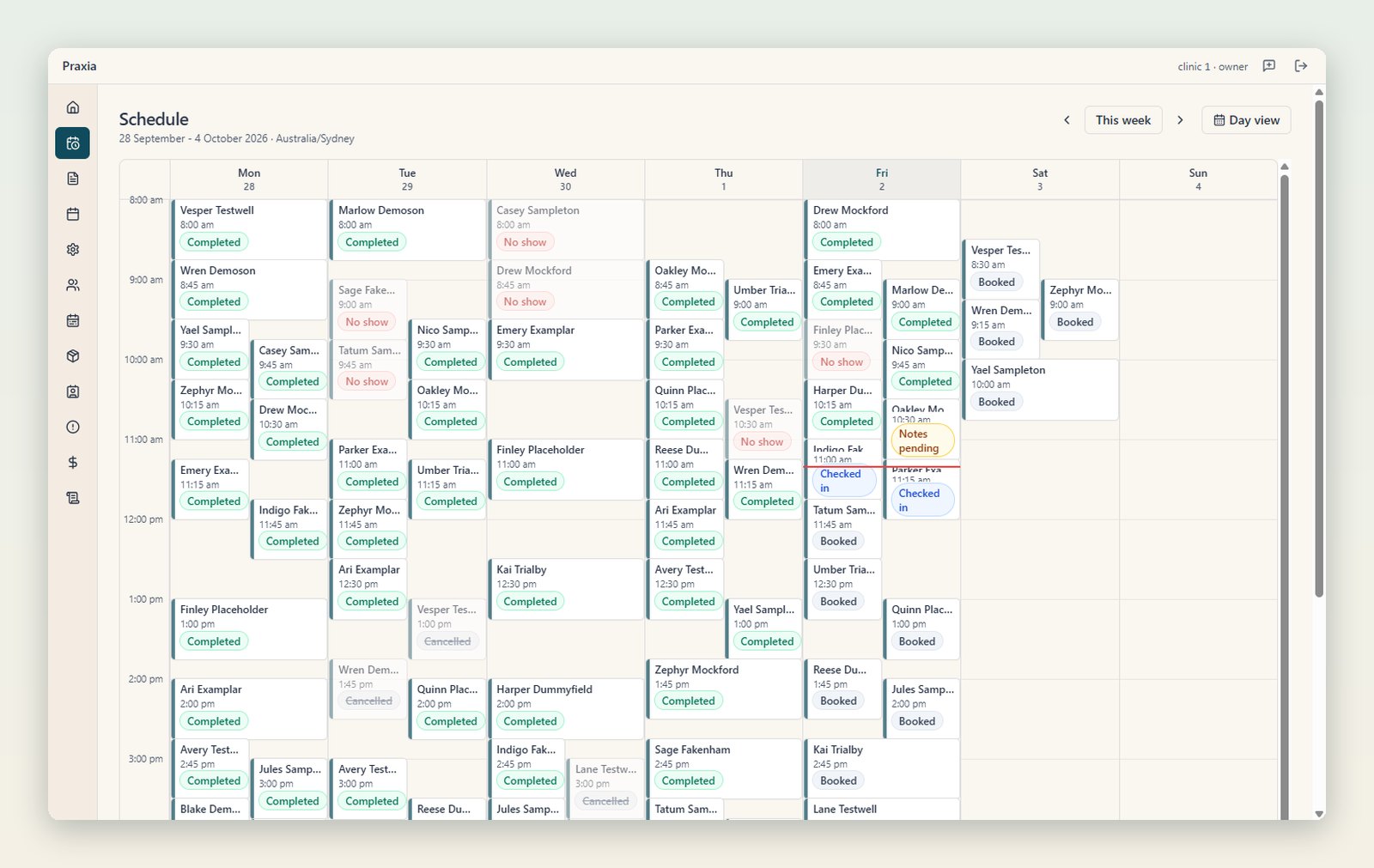
The week view shows the same appointments across seven days, so a manager can see how the week is filling up and where the gaps are.
 Tap or click to view full size
The week view of the same demo clinic. The cells are dense because three clinicians are booked across the week. Screenshot of a demo clinic with invented data.
Mid-morning: writing the note, and who signs it
A visit note is written in four SOAP sections: subjective, objective, assessment and plan. The sections autosave, the note keeps an edit history, and it cannot be signed off until the clinic’s rules are met.
 Tap or click to view full size
A signed-off visit note in the demo clinic. The small padlocks beside each section show it is now locked. The text is invented. Screenshot of a demo clinic with invented data.
The padlocks are the review state in this screenshot. Before sign-off the same sections are open for editing, and the note shows as notes pending on the schedule. The clinician decides when the record is final, not the software.
Staff can also record how a visit was paid. The billing tab of a patient lists each payment with its invoice number, amount and method.
Lunch: recording payments
 Tap or click to view full size
The billing history tab for an invented patient, listing paid invoices by date, invoice number, amount and payment method. Screenshot of a demo clinic with invented data.
Staff can record cash, bank transfer and external EFTPOS payments against an invoice. The payment method labels in this demo data are sample values. Card payments and private health claiming through Tyro Health are not shown working here, and the status page explains where that work stands.
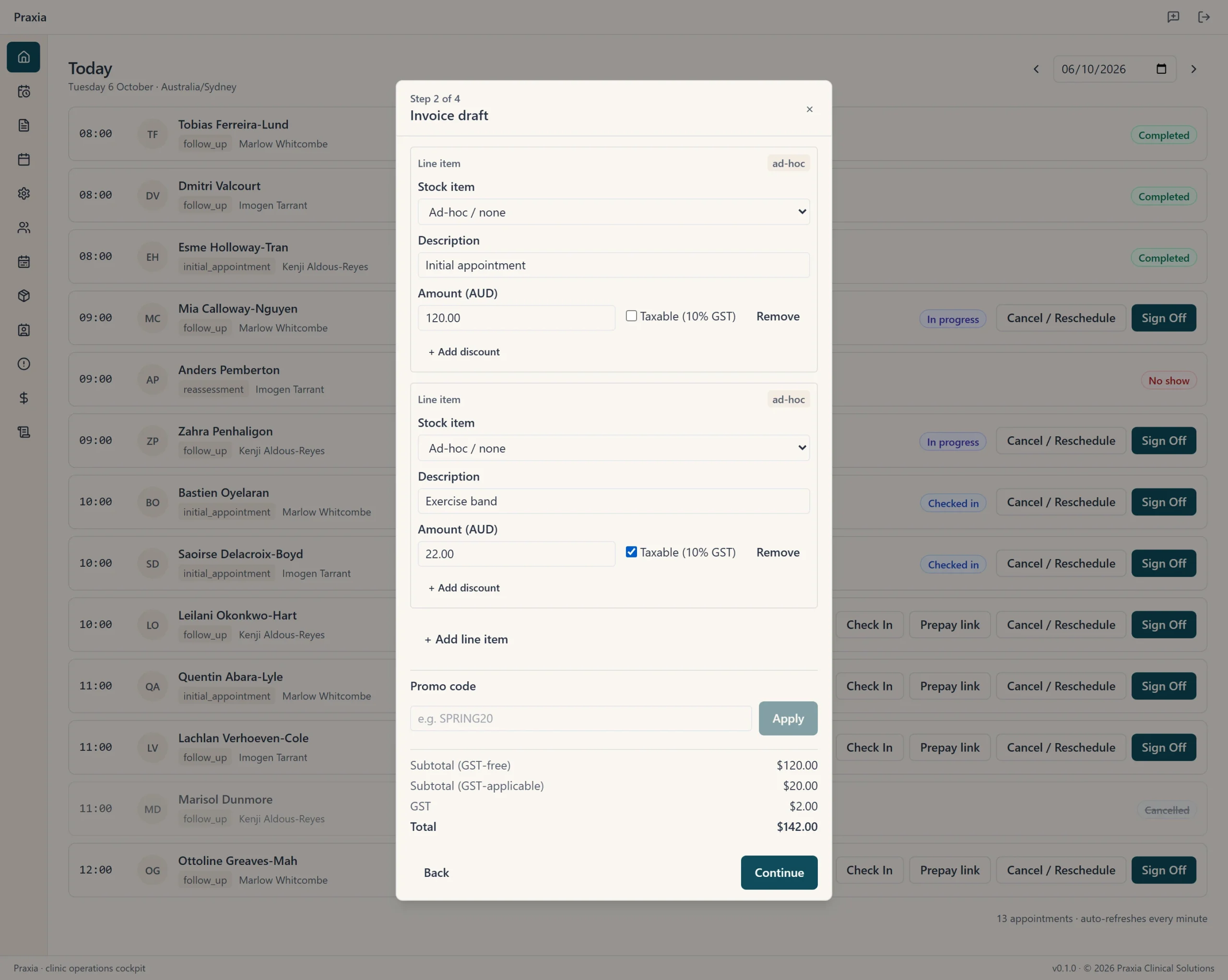
At checkout the invoice is built as a draft first, with line items and a running total, before any payment is recorded.
 Tap or click to view full size
Step 2 of 4 in the checkout flow, an invoice draft, shown over the day list. Screenshot of a demo clinic with invented data.
Afternoon: who has drifted away
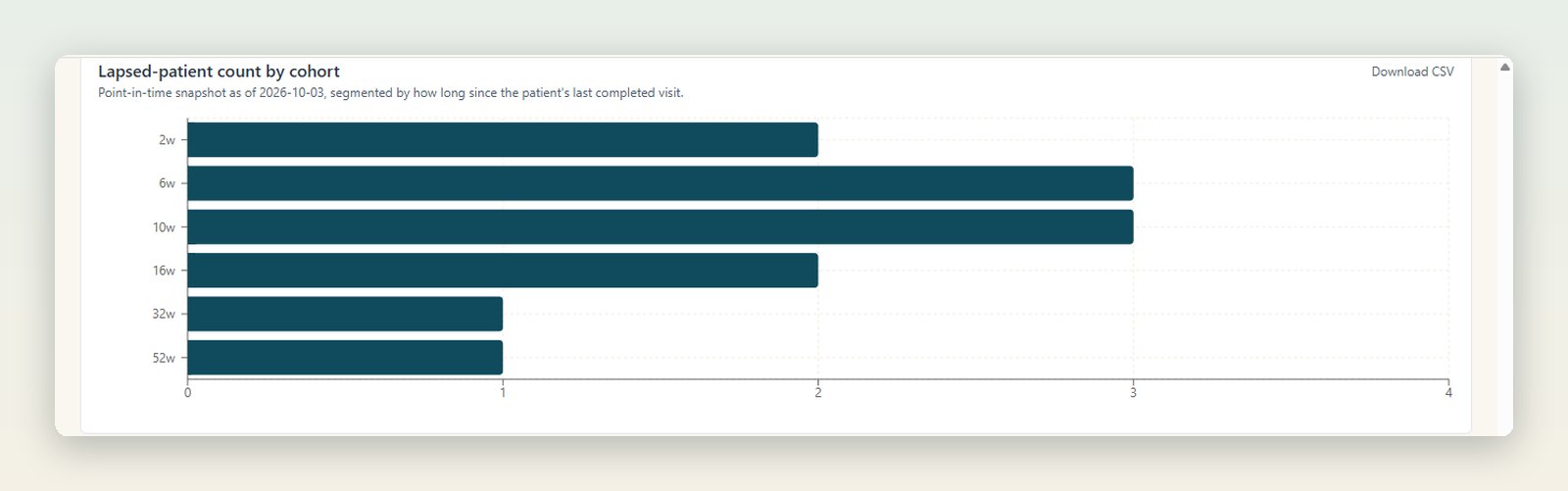
Patients whose visits stop are grouped into recall cohorts by time since they last attended, using rules the clinic sets. The chart below counts the demo clinic’s lapsed patients in each cohort, from two weeks to fifty-two weeks since the last visit.
 Tap or click to view full size
The lapsed-patient count by recall cohort in the demo clinic. Screenshot of a demo clinic with invented data.
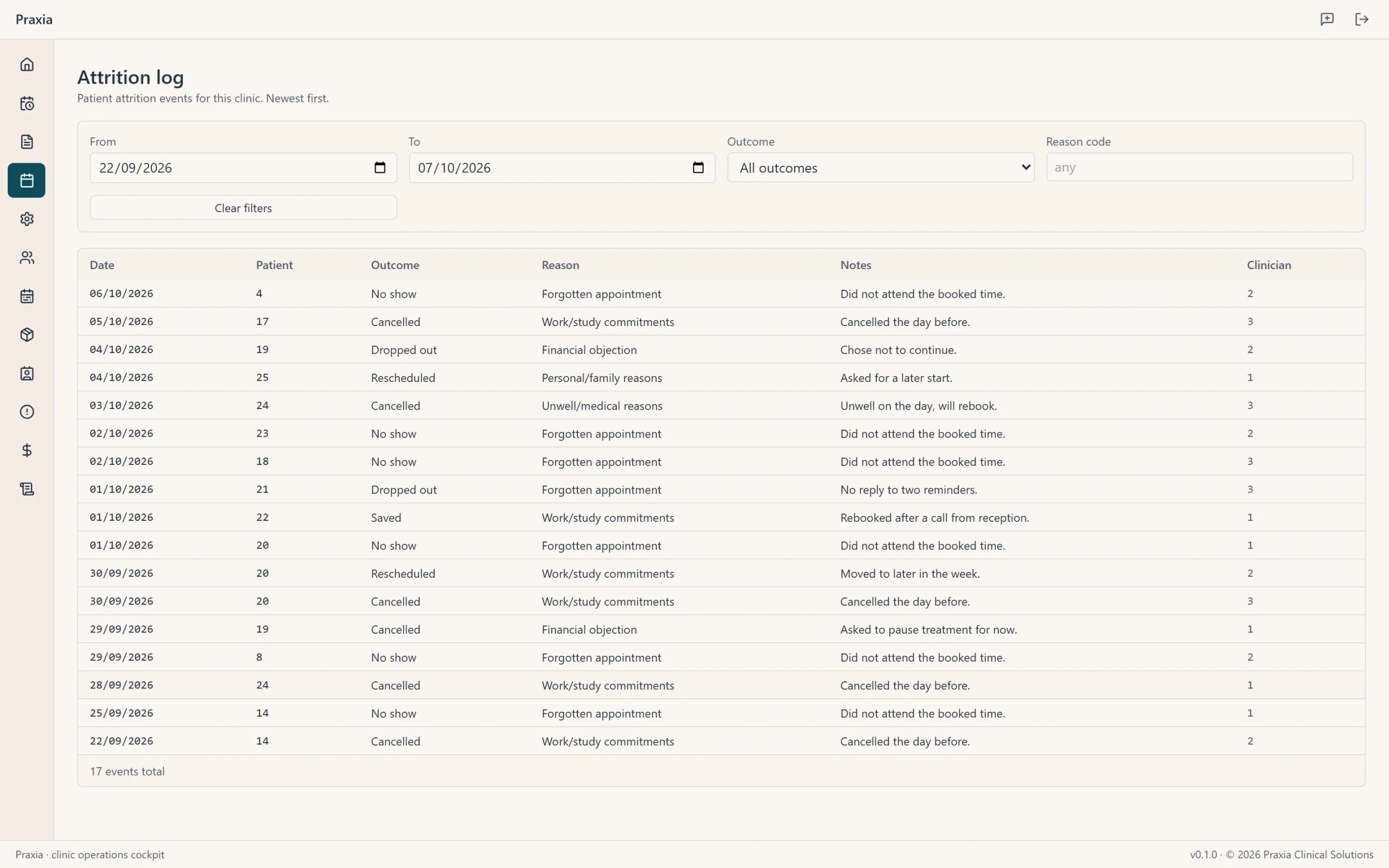
The clinic also keeps an attrition log, which lists each cancellation, no show or drop out with an outcome, a reason and notes.
 Tap or click to view full size
The attrition log in the demo clinic, 22 September to 6 October 2026. Screenshot of a demo clinic with invented data.
A recall list is a prompt for the front desk, not a promise of an outcome. Which patients get contacted, and how, stays a decision for the clinic.
End of day: the roster
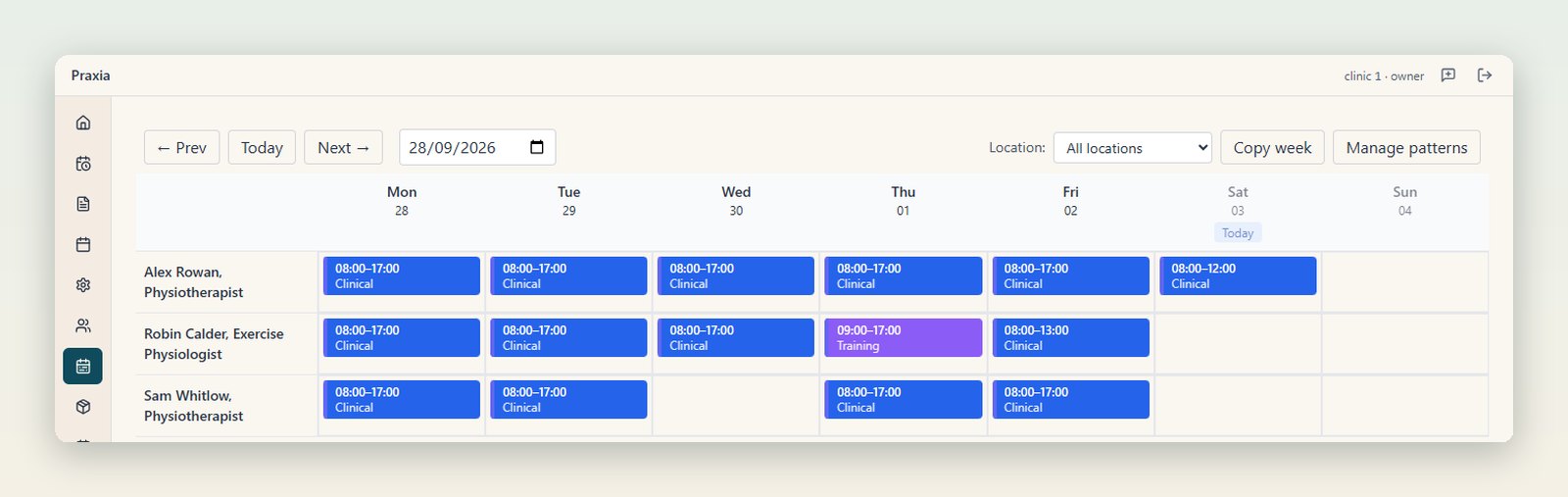
Rosters are set by week and can be copied forward, with clashes flagged before they become double bookings. Each clinician has a row and each day a coloured block for the shift type. In the demo week one clinician has a training day, one finishes early on Friday, and one is off on Wednesday.
 Tap or click to view full size
The weekly roster for the demo clinic, one row per clinician. Screenshot of a demo clinic with invented data.
End of month: the numbers
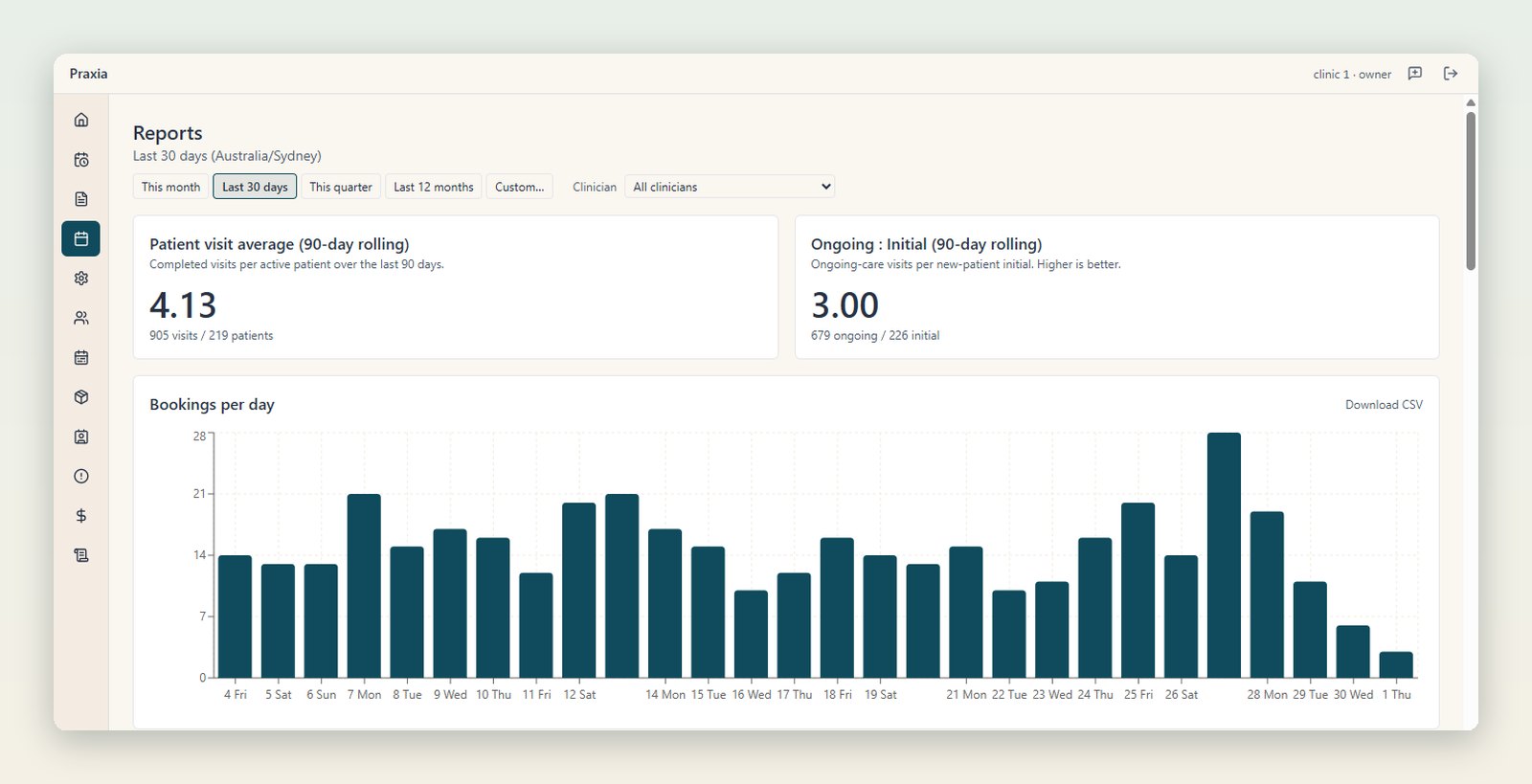
Owners and practice managers get a reports page, filterable by date and clinician. It covers bookings per day, no-show rate, revenue per visit, new patients, visit types, lapsed patients, visits per patient, retention and recall reactivation.
 Tap or click to view full size
The reports page for the demo clinic, filtered to the last 30 days, with a bookings-per-day chart. The figures are invented. Screenshot of a demo clinic with invented data.
Because the clinic here is invented, the figures are too. They show the layout of the page, not results from any clinic, and we have no pilot results to quote.
What this tour does not show
This is a tour of screens that exist and render today, taken on a laptop-sized window. It is not a tour of everything. Some areas are part of the pilot product, and some are in development. Both are listed with their status on the status page.
All screenshots here are desktop-sized. We have not included phone screenshots.
For what each area does in detail, read the features overview.
Request a walkthrough
See these screens live with someone who built them. Request a walkthrough and we will tell you honestly whether Praxia fits your clinic yet. We will reply to arrange a time.
Please leave out any patient information. How we handle your details is set out in our privacy policy.
Join early access if you are not ready to talk.
Related: A guided demo of the Praxia cockpit.